
flexile-white-logo
a
M

Integ CRM Overview

A complete walkthrough that shows how the platform works

Follow Us

Choose Your Plan

Save time because the right plan keeps your pipeline, follow up, and client management running smoothly.

One Pro

For solo business owners, freelancers, and independent professionals.

CRM Pro

For growing businesses that need automation, team workflows, and stronger follow up.

CRM Ultimate

For businesses that want the full suite, advanced automation, and Exclusive tools to scale faster.

Key Features

  • Guaranteed follow up systems that help You respond Now, stay consistent, and win more deals.
  • Pipelines and Automated Follow Up
  • Never miss the next step.
  • Calendar and Booking
  • Forms and Funnels
  • Let clients schedule instantly.
  • Capture new leads with high converting pages.
  • SMS, Email, and WhatsApp
  • Reach leads faster and build trust.
  • Payments and Invoices
  • Get paid fast and keep everything organized.

Support and Resources

Free resources, Exclusive templates, and Limited onboarding spots each month to help You go live faster.

  • Free Onboarding
  • Guided setup to launch quickly.
  • Never miss the next step.
  • Template Library
  • Funnels, messages, and workflows ready to use.

Help Center

Quick tutorials and how to guides

Contact Support

Talk to an Expert

New Big Feature: Invoice Custom Layouts

September 30, 2026

Businesses can now design their own invoice layouts with the new Layout AI Builder. Describe the invoice layout you want, and AI builds it for you. Then fine-tune any element in a visual builder and apply the layout to the invoices your customers see. You get full control over how your invoices look, without writing code or relying on one fixed template.

Create and Edit Invoice Layouts with AI

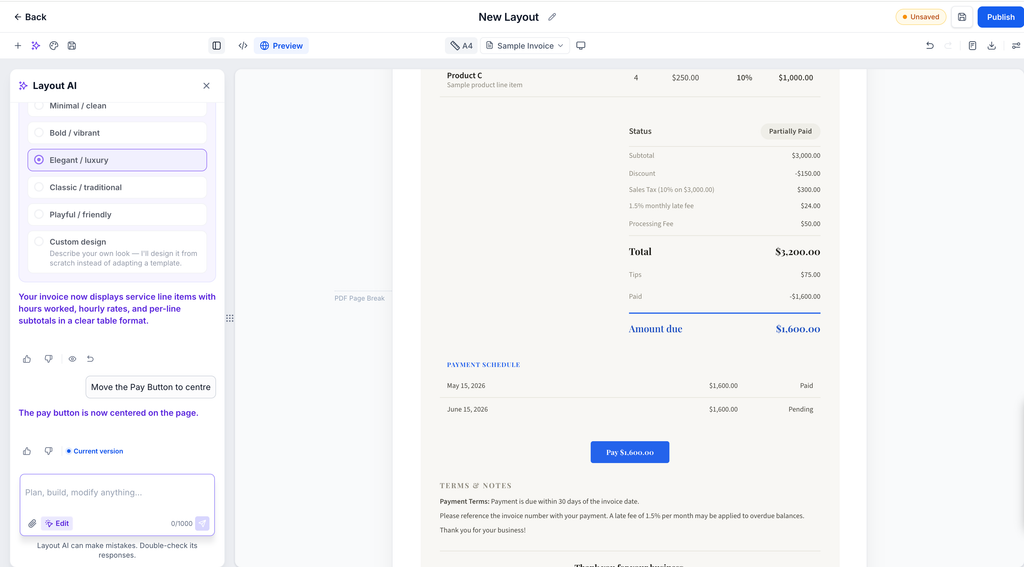
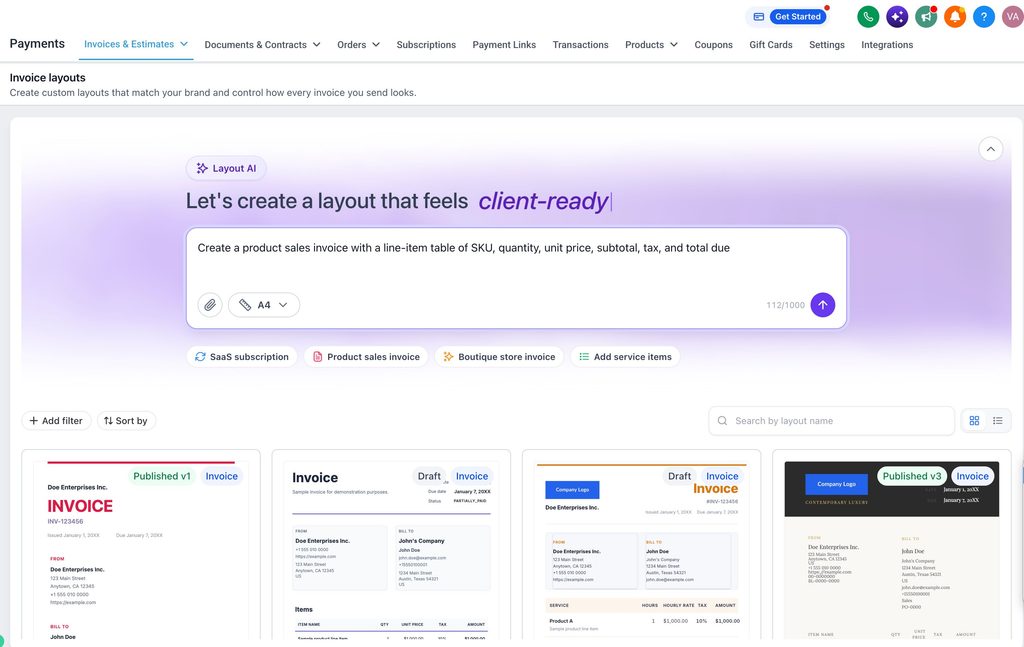
  • Generate a layout with AI - Give the builder a prompt describing the invoice you want. For example: "A clean two-column invoice with my logo top-left, an itemized table in the center, and payment terms and bank details at the bottom." See what it builds from that alone.
  • Recreate an invoice you already use - Upload or describe your current invoice layout and let AI rebuild it, instead of starting from a blank template.
  • Fine-tune the result your way - You're not locked into the first result. Keep asking Layout AI for further changes, or open the layout in the container to manually adjust style and content, and add, remove, align, or delete elements directly.
  • Every AI change saves a restore point, so you can go back to any earlier version from the chat. You can also undo changes from the toolbar.
  • Rate AI responses with a thumbs up or thumbs down to help improve results.
  • Publish is available once the layout has content. Publishing takes you back to the Layouts list, where the layout shows its new published version.
Manage All Your Layouts in One Place

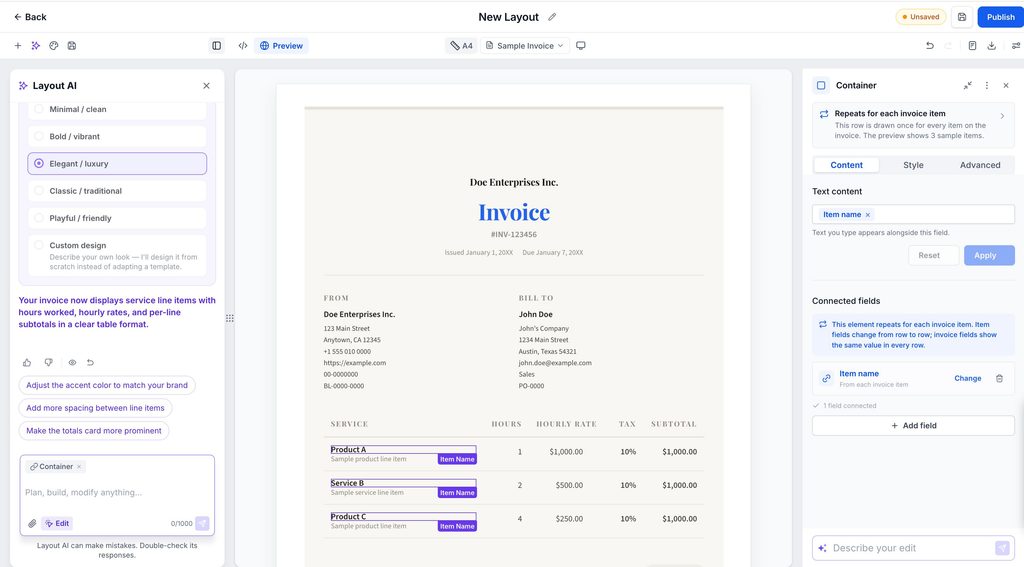
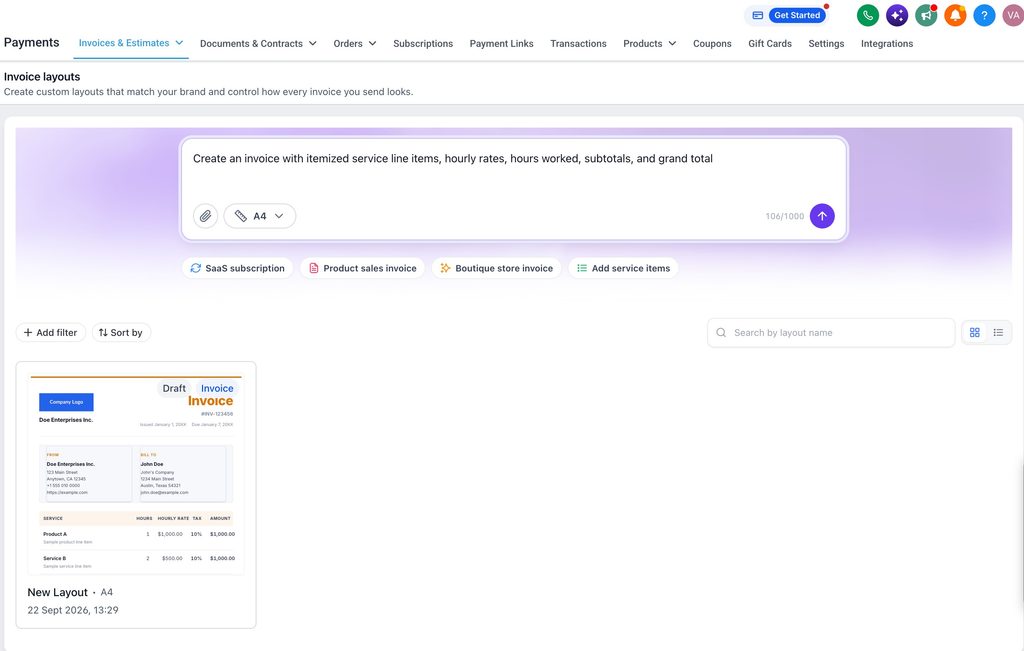
  • Build separate layouts for different clients, services, or business needs, then check your layouts list. Preview, download, clone, or delete a layout from there.
  • Switch between grid and list views.
  • Search layouts by name, and sort by name or last updated date.
  • Preview any layout without leaving the list.
  • Rename, clone, or delete a layout from its ⋮ menu.
  • View history shows who created, edited, published, or copied each layout, and when.
How do layouts work with Invoices?

  • Pick a published layout for any invoice, and your customer sees that design on the invoice preview.
  • The layout locks once you send or partially pay an invoice.
  • If you delete a layout, invoices already sent keep showing the original design.
  • Draft invoices that used a deleted layout switch to the default layout.

🔍

Where Can I Find This?

  • Go to Payments, then the Invoices & Estimates dropdown. You'll find the Layout AI Builder under Layouts.
  • Generate a layout with AI
  • Once you create and publish a layout, you can select it when creating invoices.

Recently Updates

New Big Feature: Invoice Custom Layouts

Guest Enhancements in Calendars

Multiple Meeting Durations Single Calendar

Custom Fields Dashboards and Reports

Organize and Customize Tags with Colors and Categories

Custom Fields Grouping and Bulk Actions

Communities – Editor and Community experience

Multi-Role Signing for Documents and Contracts

Full Edit Service Bookings

Payments Enhancements

New Workflow Trigger: User Replied

Contact Page Customization – in labs! 

Gift Card Creation, Selling, Sending & Redemption Now Available

Projects: Pipeline Navigation Improvements & Stage Colors

★ Canva Integration In Media Storage ★

★Introducing Rentals within Calendars★

Invoices, Estimates: Open in new tab

“Manage Smart List” and “Restore” have a new home in the menu

New Layout for Submission PDFs: Attachments and Quiz Results Page Included

★New Feature: Video Testimonials!

Icons For Buttons in the Contact Form Builder

Invoices: Editable “Payment Schedule” Notifications

Documents & Contracts: Content Library for ease of Document Creation

Payments Tab in Appointment Modal

Multiple Review Links in Emails

SMS Review Requests – Create & Use Custom Templates for Recurring Messages

Enhanced Button Styling Experience

Modern Order Bumps Now in Forms & Surveys

Wait Time in Recurring Timer

★ Social Planner: Best Time to Post Feature

Email Statistics Dashboard Updates

CRM Contacts And Client Portal

Estimates: Now support Payment Schedules/Deposits/Installments

Add Guests – Enhancements

Appointment Modal – Now in a Side Drawer

★ New Feature: Call Scripts

Improving the First-Time Experience in Calendars

★ New Feature: Multiple Review Platform Integration

Deposits and Payment Plans on Documents & Contracts!

★ New Feature: Documents and Contracts Template Library now available

Stay Ahead with INTEG CRM Insights

Subscribe to our blog and get the latest insights on enhancing customer relationships and boosting business efficiency with CRM technology. Don’t miss out on expert tips, industry news, and success strategies from INTEG CRM. Join our community today to keep your business at the forefront of innovation!

  • Knowledge
  • Experience
  • Training
  • Improvement

Unlock Your Business Potential

Keep your business evolving with the latest trends and best practices in CRM. Subscribe to our blog for regular updates on how to optimize your operations and enhance customer engagement. Get actionable advice and innovative ideas delivered straight to your inbox.

Visit Our Blog

Stay Up to Date With The Latest News & Updates

Access Premium Content

Unlock exclusive content tailored for advanced CRM users by subscribing to our premium insights. Each week, we dive deeper into strategies that drive business growth, enhance customer relationships, and optimize operational efficiency. 

Join Our Newsletter

Stay ahead of the curve with exclusive insights and tips delivered straight to your inbox! Join our newsletter today to receive the latest trends, updates, and special offers.

Follow Us